教你Win10如何获得trustedinstaller权限的方法
作者:南鸢发布时间:
我们在Win10系统中进行操作的时候,有时会遇上一些文件需要trustedinstaller权限才能操作,trustedinstaller权限是系统内部最高权限,使用安全选项卡中也不能获得这个权限,那么如何解决呢?其实我们可以在Win10右键菜单中添加“获得trustedinstaller权限”对着文件操作即可。
Win10获得trustedinstaller权限步骤:
1、首先打开记事本或在桌面上新建一个文本文档,将下面代码粘贴到记事本中,另然为 “获取trustedinstaller权限.reg”
Windows Registry Editor Version 5.00
利用这个选项,我们就可以参所有没有权限的文件进行操作了。大家可以试试这个管用的方法。
Win10获得trustedinstaller权限步骤:
1、首先打开记事本或在桌面上新建一个文本文档,将下面代码粘贴到记事本中,另然为 “获取trustedinstaller权限.reg”
Windows Registry Editor Version 5.00
[HKEY_CLASSES_ROOT\*\shell\runas]
@="获取TrustedInstaller权限"
[HKEY_CLASSES_ROOT\*\shell\runas\command]
@="cmd.exe /c takeown /f \"%1\" && icacls \"%1\" /grant administrators:F"
"IsolatedCommand"="cmd.exe /c takeown /f \"%1\" && icacls \"%1\" /grant administrators:F"
[HKEY_CLASSES_ROOT\Directory\shell\runas]
@="获取TrustedInstaller权限"
;www.winwin7.com
"NoWorkingDirectory"=""
[HKEY_CLASSES_ROOT\Directory\shell\runas\command]
@="cmd.exe /c takeown /f \"%1\" /r /d y && icacls \"%1\" /grant administrators:F /t"
"IsolatedCommand"="cmd.exe /c takeown /f \"%1\" /r /d y && icacls \"%1\" /grant administrators:F /t"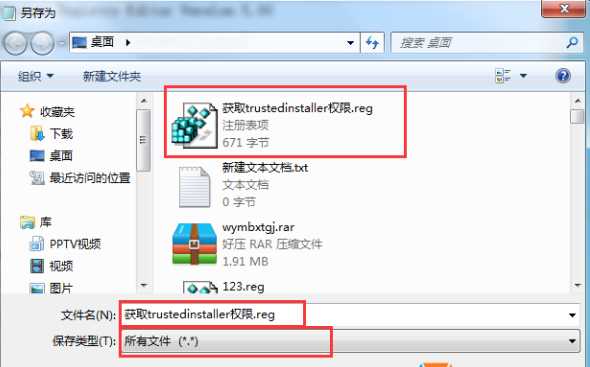
利用这个选项,我们就可以参所有没有权限的文件进行操作了。大家可以试试这个管用的方法。

复制本文链接攻略文章为3DM游戏网所有,未经允许不得转载。

软件教程更多





相关资讯更多
- WPS表格日期生成方法
- 杯与酒2026-03-10 08:52:46
- WPS怎么关闭广告
- 花栀2026-03-10 08:52:46
- Charamin OMP使用教程
- 枝桠2026-03-10 08:52:45
- wps怎么删除空白页
- ぐ夏筱沐2026-03-10 08:52:45

- WPS文档的自动编号怎么取消
- 凉堇年♀2026-03-10 08:52:45

- WPS怎么合并PDF文件
- 情の殇2026-03-10 08:52:45
- WPS怎么设置加密
- 蓝玉2026-03-10 08:52:45

- Amazing Slideshow Maker怎么使用
- 思君2026-03-10 08:52:45

- GeoVid Video Avatar如何使用
- 花栀2026-03-10 08:52:45

- wps中怎么画思维导图
- 心蛊2026-03-10 08:52:45